
Call Logicraftz Professionals +912231982472 to plan CRM implementation, CRM software setup, customer management, sale automation, and CRM strategy for business growth.
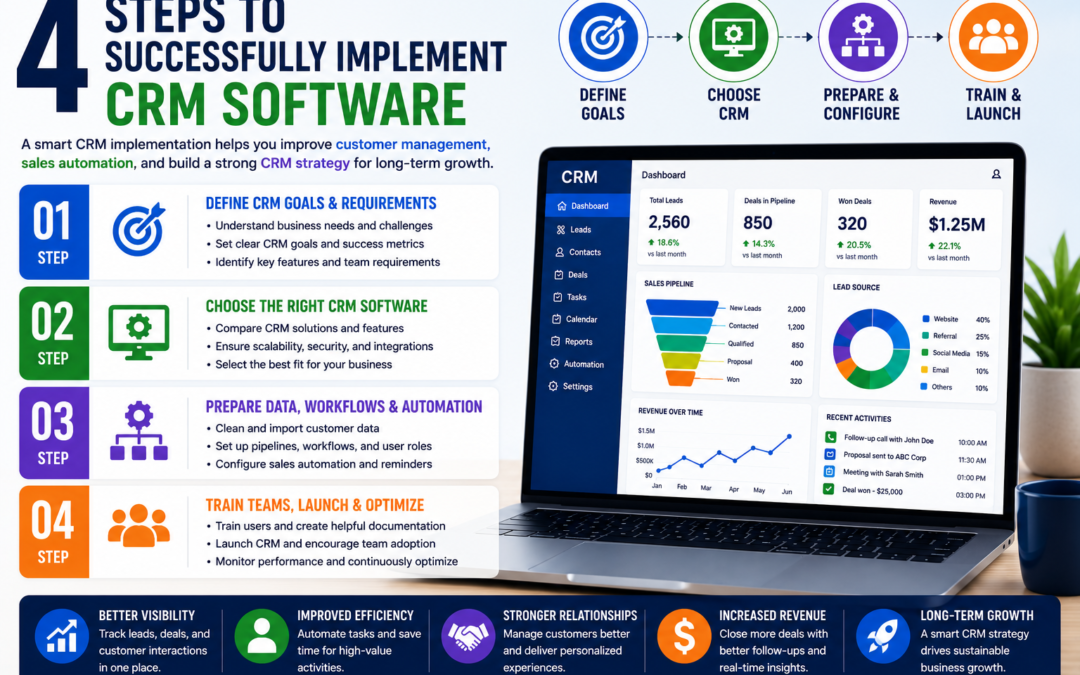
CRM Implementation: 4 Steps to Successfully Implement CRM Software
A complete guide to improve CRM software setup, customers management, sales automation, CRM strategy, lead tracking, and long-term business growth.
Introduction
CRM implementation is one of the most important steps for businesses that want to organize customer data, improve sales follow-ups, automate repetitive tasks, and build stronger customer relationships. A well-planned CRM system helps sales, marketing, support, and management teams work from one centralized platform instead of depending on scattered spreadsheets, emails, and manual reminders.
Modern CRM software allows businesses to manage leads, track customer communication, monitor sales pipelines, automate follow-ups, and generate reports that support better decision-making. However, software alone is not enough. To get real value, businesses need clean data, team training, clear sales workflows, and a practical CRM strategy.
This guide explains 4 important steps to successfully implement CRM software and use it for better customers management, stronger sale automation, and measurable business growth.

Table of Contents
- What is CRM Implementation?
- Why CRM Implementation Matters
- Key Benefits of CRM Software
- Step 1: Define CRM Goals and Requirements
- Step 2: Choose the Right CRM Software
- Step 3: Prepare Data, Workflows, and Automation
- Step 4: Train Teams, Launch, and Optimize
- Traditional Sales Process vs CRM System
- Common Mistakes to Avoid
- FAQ
What is CRM Implementation?
CRM implementation is the process of selecting, setting up, customizing, launching, and improving CRM software so a business can manage leads, customers, communication, sales activities, and reports from one system.
It is not only a technical setup. It is a business process improvement activity. The goal is to make customer data easier to access, improve lead response time, support better sale automation, and help teams manage every customer interaction professionally.
A Good CRM Setup Includes
- Customer and lead data organization
- Sales pipeline setup
- Customers management workflows
- Follow-up reminders and automation
- Sales team roles and permissions
- CRM reports and dashboards
- CRM strategy review and optimization
When implemented correctly, CRM software becomes more than a database. It becomes a complete customer relationship management engine for sales growth and business productivity.
Why CRM Implementation Matters for Growing Businesses
As a business grows, customer enquiries come from multiple sources such as websites, calls, emails, paid ads, referrals, WhatsApp, and social media. Without CRM software, leads can be missed, follow-ups can be delayed, and customer records can become difficult to manage.
A structured CRM system helps businesses create a repeatable customers management process. Every lead gets captured, every customer interaction is recorded, and every sales opportunity is tracked properly.
Every enquiry is captured and assigned to the right person.
Teams get complete customer history in one place.
Reminders, tasks, and follow-ups become easier to manage.
Managers can track pipeline, conversions, and sales activity.
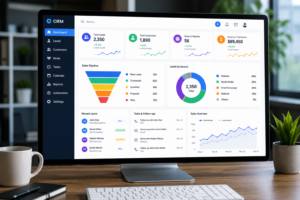
CRM software dashboard for customers management, lead tracking, and sale automation
Key Benefits of CRM Software for Business Growth
CRM software helps businesses bring structure, speed, and visibility into the sales and customer relationship process. When the system is planned properly, it improves daily productivity and creates a stronger foundation for growth.
1. Centralized Customer Data
All customer details, lead sources, conversations, purchases, and support notes stay in one system.
2. Better Customers Management
Sales and support teams can understand customer needs faster and provide more personalized service.
3. Stronger Sale Automation
Follow-up reminders, email sequences, task assignments, and pipeline updates reduce manual work.
4. Improved Sales Visibility
Managers can track lead status, active deals, conversion rates, and revenue opportunities.
5. Higher Team Productivity
Teams spend less time searching for information and more time selling, serving, and following up.
6. Better CRM Strategy
A clear process helps businesses improve sales performance, customer retention, and reporting.
Step 1: Define CRM Goals and Requirements
The first step is to define what your business wants to achieve. Without clear goals, CRM software may become only a contact database instead of a growth-focused sales and customer management system.
Important Goals to Define
- Improve lead tracking
- Centralize customer data
- Automate sales follow-ups
- Improve customers management
- Increase conversion rates
- Improve sales reporting
- Build a scalable CRM strategy
Pro Tip: Speak with your sales, marketing, support, and management teams before finalizing the system. Each team will have different requirements, and understanding them early helps avoid confusion later.
Step 2: Choose the Right CRM Software
The right CRM software should match your business size, sales process, customers management needs, automation requirements, reporting goals, and future growth plans. Choosing a tool only because it is popular or low-cost can create problems later.
Features to Look For
- Contact management
- Lead management
- Sales pipeline tracking
- Follow-up reminders
- Email and WhatsApp integration
- Sale automation workflows
- CRM reports and dashboards
- Mobile access
- Role-based user permissions
You can also review trusted CRM resources such as Salesforce CRM Guide and HubSpot CRM to understand common CRM software capabilities.
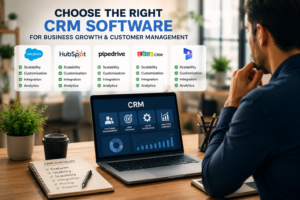
Step 3: Prepare Customer Data, Workflows, and Automation
Clean data is one of the strongest foundations of CRM success. If duplicate, outdated, or incomplete data is imported into the system, teams may lose trust in the software and continue using old methods.
Customer Data Preparation Checklist
- Remove duplicate customer records
- Update phone numbers and email addresses
- Add correct lead sources
- Import existing leads and customers
- Segment customers by service, interest, or stage
- Define required fields for sales teams
Sales Automation Workflows to Build
- Automatic lead assignment
- Follow-up reminders
- Email sequences
- Proposal follow-up tasks
- Pipeline stage notifications
- Renewal reminders
- Weekly sales reports
Sale automation should support your team, not replace meaningful customer communication. The goal is to reduce repetitive work so your team can focus on closing deals and improving customer relationships.

Step 4: Train Teams, Launch, and Optimize CRM Strategy
Team training is essential. Even the best CRM software will fail if users do not understand how to use it correctly. Training should be practical and based on real daily workflows.
CRM Training Should Cover
- How to add and update leads
- How to manage customer records
- How to move deals through pipeline stages
- How to schedule follow-ups
- How to use automation features
- How to generate CRM reports
- How to review customer communication history
After Launch, Track These Metrics
- User adoption rate
- Lead response time
- Follow-up completion rate
- Pipeline movement
- Conversion rate
- Customer retention rate
- Revenue from CRM-managed leads
After launch, your CRM strategy should be reviewed regularly. Reports, workflows, automation rules, and team usage patterns should be improved as the business grows.
Traditional Sales Process vs CRM System
| Business Area | Without CRM Software | With CRM System |
|---|---|---|
| Lead Tracking | Leads stored manually | Leads captured and tracked in one platform |
| Customers Management | Customer data is scattered | Complete customer history is available |
| Follow-ups | Manual reminders | Automated tasks and reminders |
| Reporting | Manual reports | Live dashboards and sales insights |
| Sales Process | Unstructured process | Defined pipeline and CRM strategy |
Common CRM Implementation Mistakes to Avoid
Businesses should define goals, workflows, users, and success metrics before setup.
Dirty data creates confusion and reduces confidence in the system.
Teams need proper training to use customers management and automation features.
Start with core features before adding advanced automation.
Reports help identify what is working and what needs improvement.
The system should support sales, service, reporting, and automation.
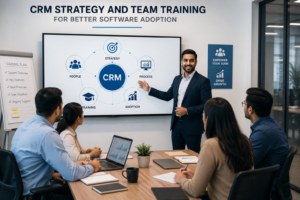
CRM strategy and team training for better software adoption
Continue Reading
FAQ: CRM Implementation
Q: What is CRM implementation?CRM implementation is the process of setting up CRM software so a business can manage leads, customers, communication, follow-ups, sales pipelines, and reports from one centralized system.
Q: Why is CRM software important?CRM software is important because it helps businesses organize customer data, improve lead tracking, automate sales follow-ups, and manage customer relationships more professionally.
Q: How does CRM improve customers management?CRM improves customers management by storing customer history, communication records, purchase details, service notes, and follow-up status in one easy-to-access platform.
Q: What is sale automation in CRM?Sale automation uses CRM features to automate lead assignment, reminders, emails, task updates, pipeline movement, and reporting activities.
Q: What should a CRM strategy include?A CRM strategy should include goals, customer workflows, sales pipeline stages, automation rules, reporting metrics, team responsibilities, and post-launch improvement plans.
Q: How long does CRM setup take?The timeline depends on the number of users, data migration, integrations, customization, training, and business complexity. Small businesses may complete setup in a few weeks, while larger systems can take longer.
Q: Can CRM integrate with existing tools?Yes. Modern CRM software can integrate with websites, email platforms, WhatsApp, ERP systems, marketing tools, accounting platforms, and reporting dashboards.
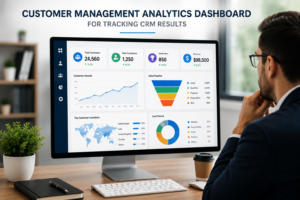
Customers management analytics dashboard for tracking CRM results
Need Help With CRM Implementation?
CRM implementation can transform how your business manages leads, customers, follow-ups, reporting, and sales activity. With the right CRM software, practical customers management process, useful sale automation, and clear CRM strategy, your business can improve productivity and sales performance.
Logicraftz Solutions LLP helps businesses plan, implement, and optimize CRM systems for measurable growth.
CRM software setup
customers management system
sales automation workflow
CRM strategy for business growth
In today's competitive business environment, delivering outstanding customer experiences while maintaining an efficient sales process has become essential. Organizations that successfully combine customer management with sale automation can strengthen customer relationships, improve team productivity, and generate sustainable business growth.
Customer management focuses on understanding every interaction throughout the customer journey, while sale automation streamlines repetitive sales activities using technology. Together, they create a connected ecosystem where businesses can attract leads, nurture prospects, close deals faster, and build long-term customer loyalty.
Whether you're a startup, SME, or enterprise, investing in customer management and sale automation enables your teams to spend less time on manual tasks and more time creating meaningful customer experiences.
What is Customer Management?
Customer management is the process of organizing, monitoring, and improving every interaction between a business and its customers. It involves collecting customer information, tracking communication history, understanding buying behavior, managing support requests, and delivering personalized experiences.
Instead of managing customer data through spreadsheets or disconnected systems, businesses use centralized platforms that provide a complete view of every customer relationship.
Effective customer management allows organizations to understand customer preferences, monitor engagement, identify opportunities, and resolve issues more efficiently.
Why Customer Management Matters
Customer expectations continue to evolve. Modern buyers expect personalized communication, faster responses, and consistent service across multiple channels.
A strong customer management strategy helps businesses:
- Build stronger customer relationships
- Improve customer satisfaction
- Increase customer retention
- Deliver personalized experiences
- Understand customer behavior
- Improve communication across teams
- Resolve customer issues quickly
- Create long-term customer loyalty
Businesses that prioritize customer relationships often experience higher customer lifetime value and stronger brand reputation.
Understanding Sales Automation
Sale automation refers to the use of software and intelligent workflows to automate repetitive sales tasks. Instead of manually assigning leads, scheduling follow-ups, updating spreadsheets, or sending reminder emails, automation handles these activities automatically.
Sales representatives can focus on building relationships, conducting meetings, and closing deals while the system manages routine administrative work.
Sale automation improves consistency, accuracy, and efficiency throughout the entire sales pipeline.
Key Features of Sales Automation
Modern sale automation solutions include powerful capabilities such as:
- Automated lead assignment
- Lead nurturing workflows
- Follow-up reminders
- Email automation
- Sales pipeline management
- Task scheduling
- Meeting management
- Quotation generation
- Proposal tracking
- Customer activity monitoring
- Deal stage updates
- Workflow approvals
- Performance dashboards
- Revenue forecasting
- Mobile sales management
These features help organizations reduce manual effort while improving sales performance.
Benefits of Customer Management
Better Customer Experience
Understanding customer needs enables businesses to provide faster responses and personalized interactions that improve satisfaction.
Improved Customer Retention
Maintaining regular communication and addressing customer concerns helps build trust and encourages repeat business.
Centralized Customer Information
A unified customer database ensures every department has access to accurate and updated information.
Personalized Communication
Businesses can deliver relevant offers, recommendations, and follow-ups based on customer interests and purchase history.
Faster Problem Resolution
Customer support teams can quickly access previous conversations and resolve issues without asking customers to repeat information.
Benefits of Sales Automation
Increased Productivity
Sales professionals spend less time on administrative work and more time engaging with qualified prospects.
Faster Lead Response
Automation ensures new enquiries receive immediate attention, increasing conversion opportunities.
Improved Sales Pipeline Visibility
Managers can monitor every opportunity, identify bottlenecks, and forecast revenue with greater accuracy.
Consistent Follow-Ups
Automated reminders ensure no prospect or customer is forgotten during the sales process.
Higher Conversion Rates
Timely communication and structured sales processes help convert more leads into paying customers.
Customer Management and Sales Automation Work Together
Customer management and sale automation complement each other by connecting customer information with intelligent workflows.
For example:
- A new website enquiry is automatically assigned to the appropriate sales representative.
- Follow-up emails are scheduled automatically.
- Customer interactions are recorded in real time.
- Sales managers receive progress updates.
- Customers receive personalized communication based on their interests.
- Completed sales trigger onboarding and support workflows.
This connected approach improves efficiency while creating a seamless customer journey.
AI-Powered Customer Management
Artificial intelligence is transforming customer management by helping businesses understand customer behavior more accurately.
AI can:
- Predict customer needs
- Recommend next best actions
- Identify buying signals
- Detect customer churn risks
- Personalize communication
- Analyze customer sentiment
- Generate intelligent reports
- Improve forecasting accuracy
These capabilities help organizations make smarter business decisions while enhancing customer satisfaction.
AI in Sales Automation
Modern sale automation platforms increasingly use AI to improve sales performance.
AI-powered automation can:
- Score leads automatically
- Recommend high-priority opportunities
- Predict deal success probability
- Suggest personalized follow-up messages
- Schedule optimal communication times
- Generate sales insights
- Forecast revenue trends
- Identify cross-selling opportunities
By combining automation with intelligent decision-making, businesses can improve sales efficiency and increase revenue.
Best Practices for Effective Customer Management
Organizations should follow several best practices to maximize customer success.
Maintain accurate customer records and regularly update contact information.
Respond to customer enquiries promptly across every communication channel.
Personalize customer interactions using historical data and preferences.
Collect customer feedback to identify opportunities for improvement.
Train employees to deliver consistent and professional customer experiences.
Review customer satisfaction metrics regularly and optimize service quality.
Best Practices for Sales Automation
Successful sale automation begins with clearly defined sales processes.
Businesses should automate repetitive activities while preserving meaningful human interactions.
Lead qualification rules should be reviewed regularly to ensure high-quality opportunities reach sales teams.
Sales workflows should be continuously optimized based on performance data.
Automation should support—not replace—relationship building.
Regular reporting helps identify opportunities for continuous improvement.
Industries That Benefit from Customer Management and Sales Automation
Nearly every industry benefits from customer management and sale automation, including:
- Manufacturing
- Healthcare
- Retail
- E-commerce
- Education
- Real Estate
- Hospitality
- Logistics
- Financial Services
- Information Technology
- Professional Services
- Construction
- Automotive
- Distribution
- Consulting
Regardless of industry, organizations that manage customer relationships effectively often achieve stronger business performance.
Future Trends in Customer Management and Sales Automation
Technology continues to reshape how businesses interact with customers.
Emerging trends include:
- Generative AI assistants
- Predictive customer analytics
- Conversational AI
- Voice-enabled CRM
- Hyper-personalization
- Intelligent workflow automation
- Omnichannel customer engagement
- Real-time customer insights
- Cloud-based collaboration
- Advanced business intelligence
Businesses adopting these innovations will be better positioned to improve customer satisfaction and increase operational efficiency.
Why Customer Management and Sales Automation Are Business Essentials
Customer expectations continue to rise while markets become increasingly competitive. Businesses can no longer rely on manual processes or disconnected systems to manage customer relationships and sales activities.
By combining customer management with sale automation, organizations create a structured, scalable, and efficient approach to customer engagement. Teams gain better visibility into customer interactions, automate repetitive work, improve collaboration, and make informed business decisions using real-time data.
Companies that invest in these capabilities are better equipped to strengthen customer loyalty, improve sales performance, accelerate digital transformation, and achieve long-term business success. As AI and automation continue to evolve, customer management and sale automation will remain fundamental drivers of sustainable growth and competitive advantage.