
12 CRM Features Every Growing Business Needs
Call Logicraftz Professionals +912231982472 to implement CRM features, CRM software, sales automation, customer management, and business growth solutions.
CRM Features: 12 Powerful Tools Every Business Needs
A complete guide to choosing the right CRM software tools for business growth, sale automation, lead tracking, and customer management.
Introduction
CRM features are essential for growing businesses that want to manage leads, improve customer relationships, automate sales activities, and support long-term business growth. As enquiries increase and customer interactions become more complex, spreadsheets and manual follow-ups are no longer enough.
Modern CRM software helps businesses organize customer data, track sales opportunities, automate follow-ups, improve customer management, and strengthen sale automation. The right CRM system gives teams better visibility into every lead, deal, conversation, and customer touchpoint.
In this blog, we will explore 12 important tools every growing business should look for when selecting a CRM platform for better sales performance, customer experience, and operational efficiency.
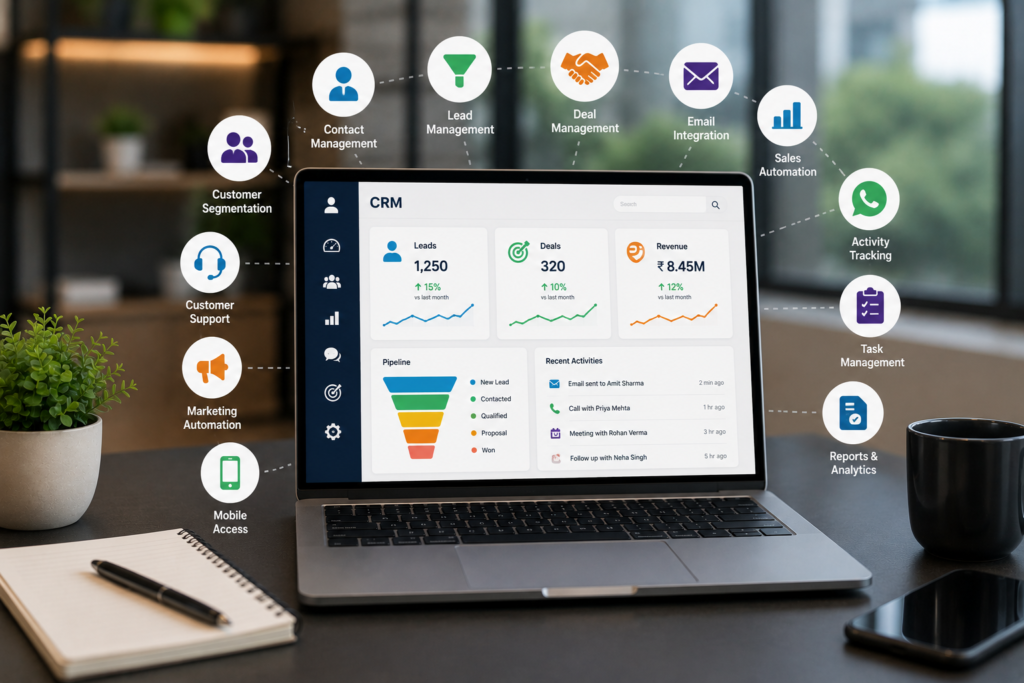
Modern CRM dashboard for sales tracking, automation, and customer management
Table of Contents
- Why CRM Features Matter
- 1. Contact Management
- 2. Lead Management
- 3. Sales Pipeline Tracking
- 4. Sale Automation
- 5. Task and Follow-Up Reminders
- 6. Customer Communication History
- 7. CRM Reporting and Analytics
- 8. Email Integration
- 9. Customer Segmentation
- 10. Mobile CRM Access
- 11. Role-Based User Access
- 12. Integration With Business Tools
- Basic CRM vs Advanced CRM System
- Common CRM Selection Mistakes
- Frequently Asked Questions
Why CRM Features Matter for Business Growth
Growing businesses need systems that help teams stay organized, respond faster, and manage customers professionally. Without proper CRM tools, leads can be missed, follow-ups can be delayed, and customer information can become scattered across emails, spreadsheets, calls, and chat messages.
A well-structured CRM system supports sales, marketing, service, and management teams with accurate customer information and process visibility. This improves decision-making and helps companies build a repeatable sales process.
Every enquiry can be captured, assigned, and followed up properly.
Teams can access customer history, preferences, and communication records.
Repetitive tasks can be automated to save time and reduce errors.
Clear reports and pipeline visibility help teams focus on revenue opportunities.
1. Contact Management
Contact management is one of the most important CRM features for any growing business. It allows teams to store and organize customer details in one place so sales and support teams can work with accurate information.
Contact Records Can Include
- Customer name and phone number
- Email address
- Company details
- Lead source
- Customer status
- Previous interactions
- Service or purchase history
When contact information is centralized, teams can respond faster and avoid confusion caused by duplicate or incomplete customer records.
2. Lead Management
Lead management helps businesses capture, assign, track, and prioritize enquiries. This is especially important for companies receiving leads from websites, social media, referrals, advertising campaigns, email marketing, and phone calls.
A strong lead management system ensures every enquiry is followed up properly and no opportunity is missed.
Lead Management Helps Track
- Lead source
- Customer requirement
- Assigned salesperson
- Lead priority
- Follow-up date
- Current sales stage
- Next action

Lead management dashboard for tracking enquiries and sales opportunities
3. Sales Pipeline Tracking
Sales pipeline tracking helps businesses see where every deal stands. A visual pipeline gives managers and sales teams a clear view of active opportunities, deal stages, expected revenue, and pending actions.
Common Pipeline Stages
- New enquiry
- Contacted
- Qualified
- Proposal sent
- Negotiation
- Closed won
- Closed lost
Pipeline visibility helps sales teams focus on high-value opportunities and improve revenue forecasting.
4. Sales Automation
Sales automation reduces repetitive tasks and improves consistency. It helps teams automate routine actions while still keeping customer communication personalized and meaningful.
Automation Can Handle
- Lead assignment
- Follow-up reminders
- Email sequences
- Task notifications
- Pipeline stage updates
- Renewal alerts
This saves time and allows sales teams to focus on customer conversations, proposals, and closing deals.
5. Task and Follow-Up Reminders
Follow-up reminders help sales teams stay on track and communicate with leads at the right time. Many sales opportunities are lost simply because prospects are not contacted when they should be.
CRM reminders make it easier to manage calls, meetings, proposal follow-ups, demo schedules, and renewal conversations.
6. Customer Communication History
A reliable CRM platform should record calls, emails, meetings, notes, and past conversations. This gives every team member better customer context before making contact.
Communication history improves personalization and ensures customers do not have to repeat the same information again and again.

Lead management dashboard for tracking enquiries and sales opportunities
7. CRM Reporting and Analytics
Reporting and analytics help businesses measure sales performance and customer activity. Managers can use dashboards to understand what is working, which channels generate leads, and where improvement is needed.
Useful Reports Include
- Lead source reports
- Sales conversion reports
- Pipeline value
- Team performance
- Customer retention data
- Revenue forecasting
Reports support better planning and faster decision-making.
8. Email Integration
Email integration helps teams send, track, and manage customer emails directly from the CRM platform. This improves communication tracking and sales productivity.
When emails are connected to customer records, sales teams can view past conversations before sending new messages.
9. Customer Segmentation
Customer segmentation helps businesses group customers based on interests, behavior, location, industry, purchase history, or buying stage.
This supports targeted communication, personalized campaigns, and better customer management.
10. Mobile CRM Access
Mobile access allows sales teams and managers to view customer data, update leads, check follow-ups, and track deals from anywhere. This is especially useful for field sales teams, business owners, and managers who travel frequently.
With mobile access, teams can respond faster and keep records updated in real time.
11. Role-Based User Access
Role-based access protects customer data by allowing users to access only the information they need. This improves data security, internal control, and accountability.
For example, sales executives may view their own leads, managers may view team reports, and administrators may control system settings.
12. Integration With Business Tools
CRM software should integrate with essential business tools such as websites, email platforms, WhatsApp, ERP systems, marketing automation tools, payment systems, and reporting dashboards.
Integration reduces duplicate work and creates a connected digital ecosystem for sales, marketing, support, and management teams.
You can learn more about CRM platforms from Salesforce CRM Guide and HubSpot CRM.

Basic CRM vs Advanced CRM System
| Area | Basic CRM | Advanced CRM System |
|---|---|---|
| Contact Management | Stores customer details | Stores complete customer history and communication |
| Sales Tracking | Limited deal updates | Visual pipeline with deal stages and revenue visibility |
| Automation | Manual follow-ups | Automated reminders, workflows, and tasks |
| Reporting | Basic reports | Advanced dashboards and forecasting |
Common CRM Selection Mistakes Businesses Should Avoid
Choose software based on business needs, not only price or popularity.
Automation saves time and improves follow-up consistency.
Mobile CRM access is useful for field teams and business owners.
Select a platform that can grow with your business.
Reports are essential for sales planning and performance review.
Teams need training to use the system effectively.
Continue Reading
Frequently Asked Questions
Q: What are CRM features?
They are tools inside CRM software that help businesses manage contacts, leads, sales pipelines, follow-ups, reports, and customer communication.
Q: Why does a growing business need CRM software?
A growing business needs CRM software to manage increasing leads, customer data, sales activity, follow-ups, and customer relationships more efficiently.
Q: How does CRM support business growth?
CRM supports business growth by improving lead conversion, customer management, sales automation, reporting, and team productivity.
Q: What is sales automation in CRM?
Sales automation uses CRM tools to automate repetitive sales tasks such as follow-up reminders, lead assignment, email sequences, and task notifications.
Q: Which CRM tool is most important?
The most important tool depends on business needs, but contact management, lead management, pipeline tracking, automation, and reporting are essential.

Need CRM Software With the Right Features?
A modern CRM system can help your business manage leads, automate follow-ups, improve reporting, and create stronger customer relationships.
Logicraftz Solutions LLP helps businesses implement CRM software with sales automation, lead management, customer management, reporting, and integrations.
Introduction
Modern businesses operate in an increasingly competitive environment where customer expectations continue to evolve. Organizations are expected to deliver faster responses, personalized experiences, and seamless communication while maintaining operational efficiency. Companies that rely on manual processes often struggle to keep pace with these demands, making digital transformation an essential part of long-term success.
Implementing CRM software enables organizations to organize customer information, improve collaboration, streamline operations, and make informed decisions using real-time business data. Combined with effective customer management strategies and intelligent sales automation, businesses can improve productivity, strengthen customer relationships, and accelerate business growth.
Whether serving a handful of clients or managing thousands of customer interactions every month, modern organizations require scalable solutions that support efficiency, transparency, and continuous improvement.
What is CRM Software?
A CRM platform is a centralized business solution that helps organizations manage customer interactions throughout the entire customer lifecycle. It stores contact information, communication records, enquiries, quotations, meetings, support requests, documents, and activity history in one secure location.
Instead of using disconnected spreadsheets or multiple applications, employees access a single source of accurate information that supports better communication and faster decision-making.
The platform becomes the foundation for stronger customer engagement while helping every department work together more effectively.
Why Businesses Need Digital Transformation
Customer expectations have changed dramatically over the past few years. Buyers expect organizations to respond quickly, understand their preferences, and provide consistent service regardless of the communication channel.
Businesses that embrace digital transformation benefit from:
- Faster communication
- Improved collaboration
- Better operational visibility
- Reduced manual work
- Stronger customer engagement
- Improved data accuracy
- Better resource utilization
- Increased operational transparency
- Smarter planning
- Sustainable long-term development
Organizations that modernize their processes are better prepared to compete in rapidly changing markets.
Strengthen Customer Relationships Through Better Organization
Building meaningful customer relationships begins with understanding every interaction.
A centralized platform allows employees to review:
- Contact details
- Previous conversations
- Product interests
- Purchase history
- Meeting records
- Service requests
- Quotations
- Support activities
- Business documents
- Customer preferences
Having complete information available enables employees to provide personalized assistance while improving response times.
Customers appreciate businesses that remember previous conversations and provide relevant solutions without unnecessary delays.
Improve Team Collaboration
Business success depends on effective collaboration between departments.
A centralized system connects:
- Marketing
- Sales
- Customer support
- Finance
- Operations
- Management
Every team works with the same information, reducing duplication while improving communication across the organization.
Better collaboration creates smoother customer experiences and improves internal productivity.
Streamline Daily Operations
Employees often spend valuable time performing repetitive administrative activities.
Technology helps simplify routine processes including:
- Enquiry assignment
- Meeting scheduling
- Reminder creation
- Customer notifications
- Activity recording
- Document management
- Internal approvals
- Status updates
- Communication tracking
- Report generation
Reducing repetitive work allows employees to focus on strategic responsibilities that contribute greater value to the organization.
Improve Business Productivity
Higher productivity results from better organization rather than increased workload.
Modern business platforms improve efficiency by:
- Organizing information
- Simplifying communication
- Reducing paperwork
- Supporting collaboration
- Improving accountability
- Accelerating approvals
- Eliminating duplicate records
- Increasing transparency
- Supporting remote work
- Improving operational consistency
When employees spend less time searching for information, they have more time to serve customers effectively.
Sales Automation Creates Consistent Business Processes
Growing organizations often struggle with missed follow-ups, delayed responses, and inconsistent communication.
Implementing sales automation helps standardize important business activities while reducing manual effort.
Organizations can automate:
- Welcome messages
- Appointment reminders
- Opportunity assignments
- Internal alerts
- Approval workflows
- Task scheduling
- Communication sequences
- Customer notifications
- Activity updates
- Follow-up reminders
Automation improves operational consistency while ensuring important opportunities are never overlooked.
Employees remain focused on relationship building rather than repetitive administration.
Better Customer Management Improves Business Performance
Effective customer management extends beyond maintaining customer records.
Successful organizations understand customer expectations, monitor interactions, and continuously improve communication.
Key advantages include:
- Personalized service
- Faster issue resolution
- Improved communication
- Better customer satisfaction
- Increased engagement
- Higher retention
- Stronger trust
- Better relationship building
- Improved decision-making
- Long-term business value
Organizations that prioritize customer relationships often experience stronger brand reputation and sustainable success.
Artificial Intelligence Supports Smarter Decisions
Artificial Intelligence has become an important part of modern business software.
AI-powered capabilities help organizations:
- Analyze customer behavior
- Predict future opportunities
- Recommend next actions
- Generate business insights
- Improve forecasting
- Identify operational bottlenecks
- Personalize communication
- Detect emerging trends
- Support strategic planning
- Improve organizational performance
Rather than replacing employees, AI provides valuable recommendations that support faster and more informed decisions.
Cloud Technology Enables Flexible Business Operations
Cloud-based platforms provide secure access to business information from virtually anywhere.
Employees working remotely, visiting customers, or traveling can securely access important information using smartphones, tablets, laptops, or desktop computers.
Cloud technology provides:
- Remote accessibility
- Automatic updates
- Reliable backups
- Enhanced security
- Lower maintenance costs
- Better scalability
- Improved collaboration
- Business continuity
- Faster implementation
- Flexible expansion
These advantages help organizations remain agile while supporting future growth.
Data Security Protects Valuable Information
Protecting customer information is essential for maintaining trust and regulatory compliance.
Modern business platforms include:
- Role-based permissions
- Multi-factor authentication
- Data encryption
- Secure cloud infrastructure
- Activity monitoring
- Audit trails
- Automatic backups
- Disaster recovery
- Permission management
- Compliance support
Strong security practices reduce business risk while increasing customer confidence.
Analytics Drive Better Business Growth
Sustainable business growth depends on understanding operational performance.
Interactive dashboards provide valuable insights into:
- Revenue trends
- Customer engagement
- Employee productivity
- Operational efficiency
- Opportunity progress
- Service quality
- Business performance
- Resource utilization
- Customer satisfaction
- Strategic objectives
Access to reliable information allows business leaders to make confident decisions while identifying opportunities for improvement.
Industries Using Modern CRM Solutions
Organizations across numerous industries successfully use intelligent business platforms.
These include:
- Manufacturing
- Healthcare
- Retail
- Education
- Hospitality
- Logistics
- Financial Services
- Construction
- Information Technology
- Automotive
- Professional Services
- Distribution
- Real Estate
- Consulting
- E-commerce
Every customer-focused organization benefits from improved organization, stronger collaboration, and better communication.
Why Businesses Choose Logicraftz
Logicraftz helps organizations modernize operations through customized technology solutions designed to improve efficiency, productivity, and long-term success. Instead of providing generic software, the company develops solutions tailored to individual business requirements, ensuring every implementation aligns with operational goals.
Its expertise includes CRM implementation, ERP development, AI integration, workflow optimization, cloud solutions, website development, business automation, mobile applications, and digital transformation consulting.
The Logicraftz team supports clients through consultation, planning, customization, deployment, employee training, and ongoing technical assistance. This collaborative approach ensures businesses maximize technology investments while preparing for future expansion.
Organizations partnering with Logicraftz benefit from reliable technology, experienced professionals, scalable solutions, and continuous innovation designed to improve operational performance and customer engagement.
Conclusion
Businesses that embrace digital transformation are better positioned to adapt to changing customer expectations and evolving market conditions. By combining intelligent CRM software, structured customer management, efficient sales automation, and data-driven strategies, organizations create stronger customer relationships while improving operational performance.
Investing in modern technology is more than adopting new software—it is about creating a connected business environment where employees collaborate effectively, customers receive exceptional experiences, and leadership gains the insights needed for confident decision-making.
As competition continues to increase, organizations that invest in intelligent business solutions today will build the foundation for sustainable business growth, stronger customer relationships, and long-term success in the digital economy.